
Using tools
To make a tool available to the specific agent, you must add it to the Tools tab in the agent’s configuration screen.
To make a tool available:
-
Navigate to Agents > Agents tab.
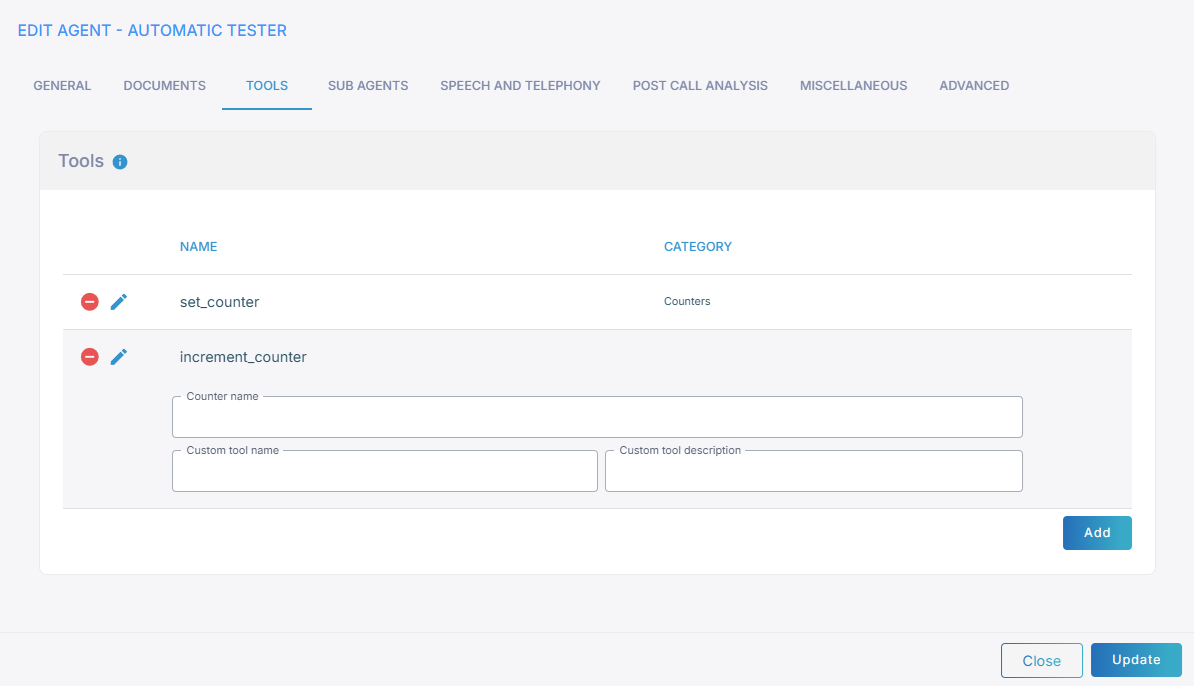
-
Select the tool and click Edit.
- Click Add and select the tool.
- (Optional) Configure the tool-specific parameters. These parameters are optional and can be left at their default values.
- Use Custom tool name and Custom tool description to override the tool's default name and description — the text the LLM relies on to decide when and how to call the tool. If left empty, the defaults are used. Customizing them can improve the reliability of tool calling, for example to:
- disambiguate between several similar tools available to the same agent, so the LLM picks the right one;
- align the tool's name with the terminology used in the agent's prompt;
- give a domain-specific description that clarifies when the tool should (and should not) be called.
- See Pre-defined tools for a detailed description of parameters supported for specific pre-defined tools.
- Use Custom tool name and Custom tool description to override the tool's default name and description — the text the LLM relies on to decide when and how to call the tool. If left empty, the defaults are used. Customizing them can improve the reliability of tool calling, for example to:
Referencing tool in prompt
In some scenarios, you may also need to provide explicit instructions to the agent on when and how to call the tools. This can be done by adding relevant instructions in the agent’s prompt. For example:
Use `find_appointments` tool to find user's appointments.If the tool has certain mandatory parameters, instruct the agent to provide them. For example:
Use `convert_multiple_times` tool with `to_timezone` parameter set to "Europe/Paris" to convert the received time slots to local timezone.When referencing tool in prompt, it is recommended to enclose the tool and parameter names in backticks, and parameter values in quotes, to separate them from the rest of the prompt text and benefit from the prompt's syntax highlighting capabilities.
You can skip explicitly mentioning the tool name in the prompt and rely on LLM to automatically determine when to call the proper tool based on its description. This approach however is less reliable and may not work well with weaker LLMs – e.g. gpt-4o-mini.
Remember, you must ALWAYS add the tools that an agent can use in the TOOLS tab in the agent’s configuration screen. Simply mentioning the tool name in the prompt is NOT enough.